Openclaw 接入 Nonelinear

概述

本文档将指导你在服务器上安装 OpenClaw,并接入 NoneLinear 统一 API 平台。通过 NoneLinear,你可以用一个 API 接入点调用多家主流大模型厂商的模型,包括 OpenAI、Anthropic、Google、DeepSeek、字节豆包等。 NoneLinear 同时支持两种协议接入:
  • OpenAI 兼容协议
  • Anthropic 原生协议

前置要求

  • 一台 Linux 服务器(Ubuntu/CentOS/Debian 等主流发行版)
  • Node.js 环境(建议 v18+)及 npm
  • NoneLinear 平台的 API Key(获取 API Key

一、安装 OpenClaw

Step 1 全局安装 OpenClaw

sudo npm install -g openclaw@latest

Step 2 初始化配置

运行 quickstart 向导,完成基础配置并安装守护进程:
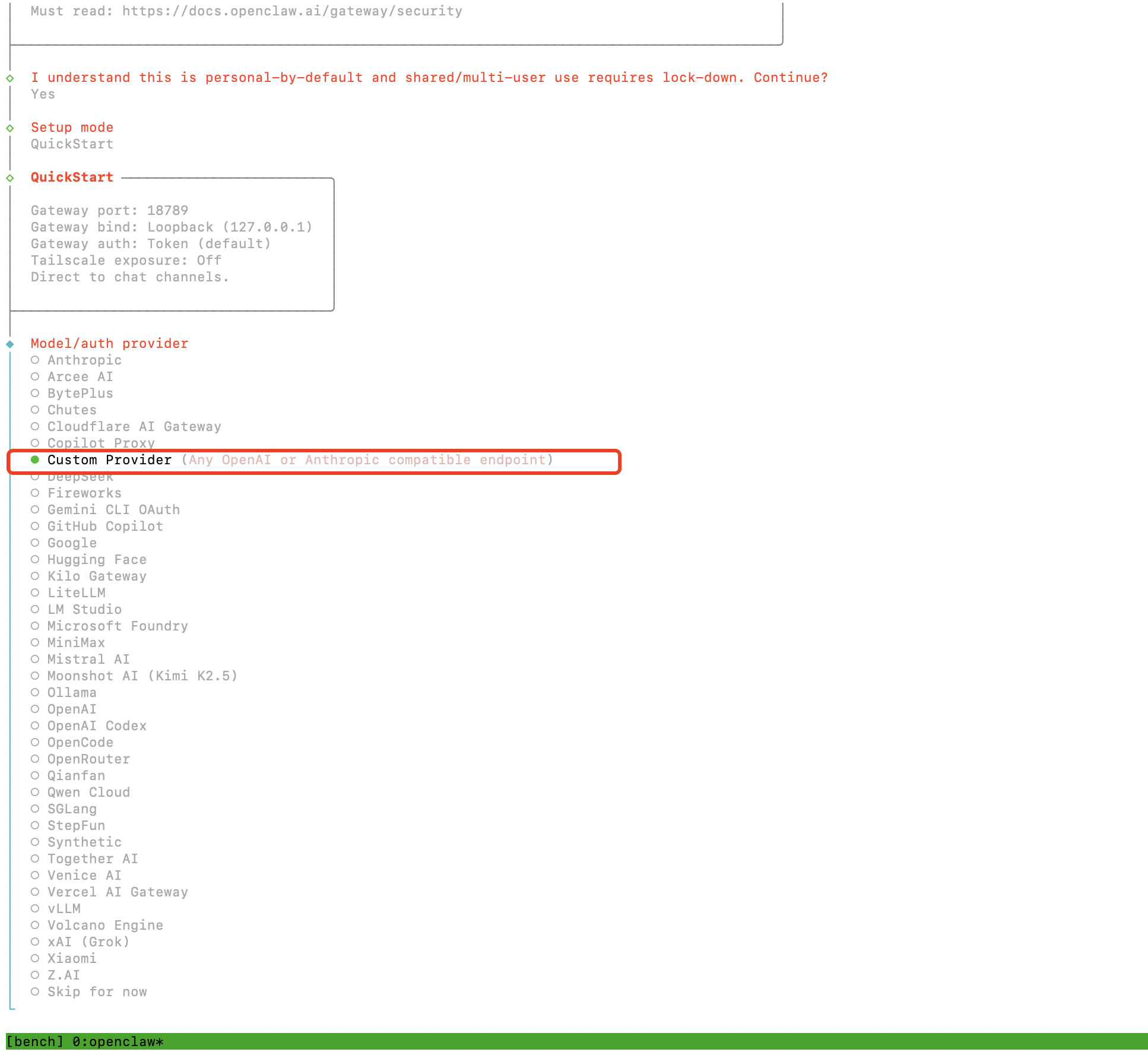
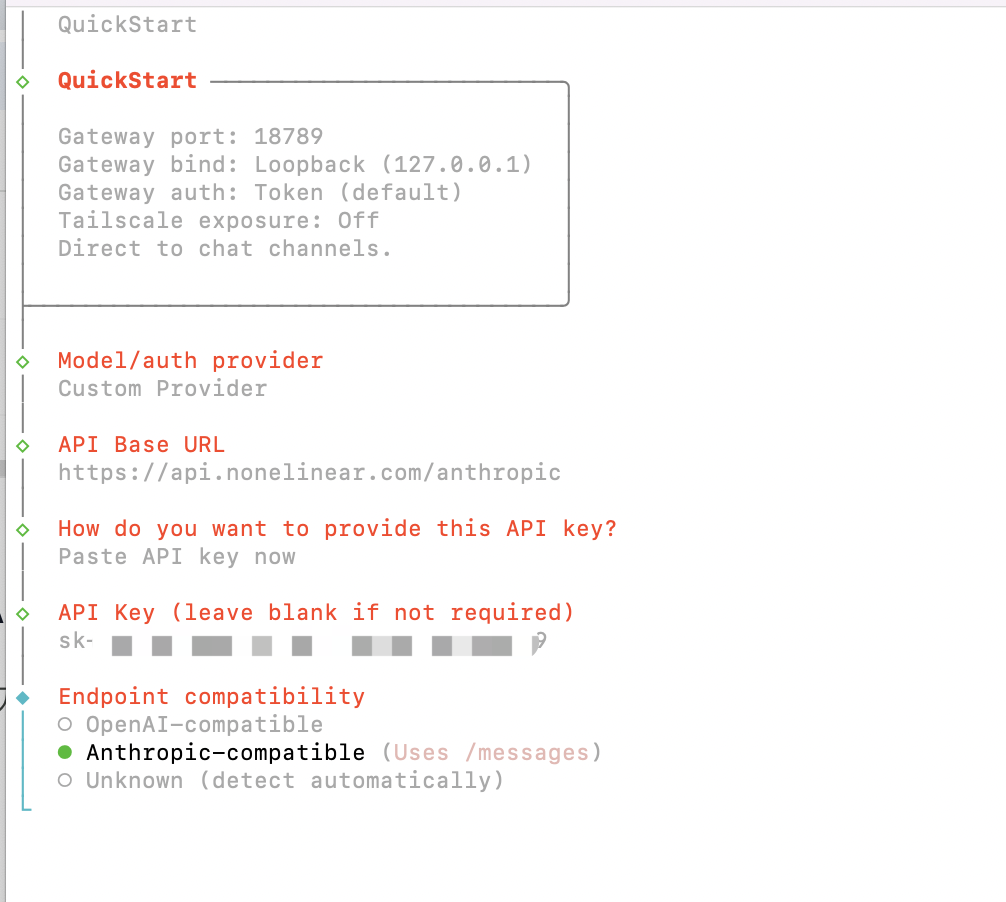
openclaw onboard --install-daemon
openclaw quickstart配置界面 openclaw quickstart配置界面 QuickStart中的 Model/auth provider 步骤,选择 Custom Provider(Any OpenAI or Anthropic compatible endpoint),然后按以下方式填写(以 Anthropic 格式为例):
字段填写内容
API Base URLhttps://api.nonelinear.com/anthropic
API Key你的 NoneLinear API Key
Endpoint compatibilityAnthropic-compatible(OpenAI格式的就选OpenAI-compatible
Model IDNoneLinear 模型广场,例如 claude-haiku-4.5
注意:
  1. QuickStart中的配置仅用于验证,后续配置多模型、多Agent等,会通过修改配置文件进行完整覆盖。
  2. 如果 channel 部分选择飞书的,可以参考 相关教程

Step 3 停止网关

在修改配置文件前,先停止网关服务:
openclaw gateway stop

二、配置 NoneLinear API(OpenAI 兼容协议)

这是最常用的接入方式,使用 OpenAI Chat Completions 兼容的协议格式。所有通过 NoneLinear 接入的模型均可使用此协议。

方法一:编辑配置文件

打开配置文件:
vim ~/.openclaw/openclaw.json
将配置修改为以下内容(核心配置示例,models 按需添加):
{
  "models": {
    "providers": {
      "nonelinear": {
        "baseUrl": "https://api.nonelinear.com/v1",
        "apiKey": "${OPENAI_API_KEY}",
        "api": "openai-completions",
        "models": [
          { "id": "claude-opus-4.6", "name": "NoneLinear claude-opus-4.6" },
          { "id": "gpt-5.2", "name": "NoneLinear gpt-5.2" },
          { "id": "DeepSeek-V3.2", "name": "NoneLinear DeepSeek-V3.2" },
          { "id": "MiniMax-M2.7", "name": "NoneLinear MiniMax-M2.7" }
        ]
      }
    }
  },
  "agents": {
    "defaults": {
      "model": { "primary": "nonelinear/MiniMax-M2.7" },
      "models": {
        "nonelinear/claude-opus-4.6": {},
        "nonelinear/gpt-5.2": {},
        "nonelinear/DeepSeek-V3.2": {}
      }
    }
  }
}
关键字段说明
  • baseUrl 设为 https://api.nonelinear.com/v1
  • api 字段设为 "openai-completions"
  • apiKey 使用环境变量引用 ${OPENAI_API_KEY}

方法二:命令行配置

如果你更喜欢用命令行,也可以直接运行:
# 配置 provider
openclaw config set 'models.providers.nonelinear' --json '{
  "baseUrl": "https://api.nonelinear.com/v1",
  "apiKey": "${OPENAI_API_KEY}",
  "api": "openai-completions",
  "models": [
    { "id": "claude-opus-4.6", "name": "NoneLinear claude-opus-4.6" },
    { "id": "gpt-5.2", "name": "NoneLinear gpt-5.2" },
    { "id": "DeepSeek-V3.2", "name": "NoneLinear DeepSeek-V3.2" }
  ]
}'

# 设置默认模型
openclaw config set 'agents.defaults.model' --json '{
  "primary": "nonelinear/MiniMax-M2.7"
}'

三、配置 NoneLinear API(Anthropic 原生协议)

如果你需要使用 Anthropic 原生协议,配置方式与 OpenAI 协议几乎一模一样,只需修改两个字段:
配置项OpenAI 兼容协议Anthropic 原生协议
baseUrlhttps://api.nonelinear.com/v1https://api.nonelinear.com/anthropic
apiopenai-completionsanthropic-messages
注意:除了 baseUrlapi 字段之外,其余配置(apiKey、models 列表等)一致。

配置文件示例

{
  "models": {
    "providers": {
      "nonelinear": {
        "baseUrl": "https://api.nonelinear.com/anthropic",
        "apiKey": "${OPENAI_API_KEY}",
        "api": "anthropic-messages",
        "models": [
          { "id": "claude-opus-4.6", "name": "NoneLinear claude-opus-4.6" },
          { "id": "claude-opus-4.6-thinking", "name": "NoneLinear claude-opus-4.6-thinking" },
          { "id": "claude-haiku-4.5", "name": "NoneLinear claude-haiku-4.5" }
        ]
      }
    }
  }
}

命令行方式

openclaw config set 'models.providers.nonelinear' --json '{
  "baseUrl": "https://api.nonelinear.com/anthropic",
  "apiKey": "${OPENAI_API_KEY}",
  "api": "anthropic-messages",
  "models": [
    { "id": "claude-opus-4.6", "name": "NoneLinear claude-opus-4.6" },
    { "id": "claude-opus-4.6-thinking", "name": "NoneLinear claude-opus-4.6-thinking" },
    { "id": "claude-haiku-4.5", "name": "NoneLinear claude-haiku-4.5" }
  ]
}'

四、启动与验证

Step 1 重启网关

openclaw gateway restart

Step 2 探测模型可用性

openclaw models status --probe

Step 3 查看整体状态

openclaw models status
成功标志:如果以上命令均正常返回模型列表和状态信息,说明 OpenClaw 已成功接入 NoneLinear 平台!

五、多模态能力扩展

完成上述基础接入后,OpenClaw 已经具备文本对话能力。如果你需要让 agent 能”看图、画图、生视频”,本节将逐步介绍如何在前面配置的基础上启用三类多模态能力:视觉理解图像生成视频生成
OpenClaw 多模态架构提示OpenClaw 通过四个独立字段控制多模态路由:
  • agents.defaults.imageModel — 视觉理解(看图)
  • agents.defaults.pdfModel — PDF 理解
  • agents.defaults.imageGenerationModel — 图像生成(画图)
  • agents.defaults.videoGenerationModel — 视频生成
这些字段独立于 agents.defaults.model,允许”主聊天用便宜模型,多模态调用切到能力更强的模型”。

1. 视觉理解(看图)

视觉理解是最简单的多模态能力,只需在模型声明中加一个 input 字段即可启用。

工作机制

当用户发送图片时,OpenClaw 检查当前会话使用的模型是否在 models[].input 中声明了 "image"
  • 声明了 → 直接把原图作为原生输入传给该模型
  • 没声明 → 路由到 agents.defaults.imageModel.primary 指定的视觉专用模型处理

配置示例

在前面接入配置的基础上,给模型加 input 字段,并配置 imageModel
{
  "models": {
    "providers": {
      "nonelinear": {
        "baseUrl": "https://api.nonelinear.com/v1",
        "apiKey": "${OPENAI_API_KEY}",
        "api": "openai-completions",
        "models": [
          {
            "id": "claude-opus-4.6",
            "name": "NoneLinear claude-opus-4.6",
            "input": ["text", "image"],
            "contextWindow": 200000,
            "maxTokens": 16384
          },
          {
            "id": "Qwen3-VL-235B",
            "name": "NoneLinear Qwen3-VL-235B",
            "input": ["text", "image"]
          },
          {
            "id": "DeepSeek-V3.2",
            "name": "NoneLinear DeepSeek-V3.2",
            "input": ["text"]
          }
        ]
      }
    }
  },
  "agents": {
    "defaults": {
      "model": {
        "primary": "nonelinear/DeepSeek-V3.2"
      },
      "imageModel": {
        "primary": "nonelinear/Qwen3-VL-235B",
        "fallbacks": ["nonelinear/claude-opus-4.6"]
      },
      "pdfModel": {
        "primary": "nonelinear/Qwen3-VL-235B"
      },
      "imageMaxDimensionPx": 1200,
      "models": {
        "nonelinear/claude-opus-4.6": {},
        "nonelinear/Qwen3-VL-235B": {},
        "nonelinear/DeepSeek-V3.2": {}
      }
    }
  }
}
关键字段说明
  • input 数组合法值:"text" / "image" / "audio" / "video"
  • imageModel.primary 仅在主模型不支持视觉时才会被使用
  • pdfModel 未配置时自动 fallback 到 imageModel
  • imageMaxDimensionPx(默认 1200)控制传入模型前的等比下采样上限

验证视觉理解

openclaw infer image describe \
  --file ./test.jpg \
  --model nonelinear/Qwen3-VL-235B
或直接在已连通的 channel(飞书、Telegram 等)发一张图片给 agent。

2. 图像生成(画图)

OpenClaw 的图像生成走 image_generate 工具,由 agents.defaults.imageGenerationModel 字段控制。
重要前提image_generate 工具仅在至少一个图像生成 Provider 已注册时才会出现在 agent 的 tools 列表中。OpenClaw 官方文档明确说明:显式覆写 models.providers.openai.baseUrl 指向自定义端点,OpenClaw 会把图像生成请求直接发到该端点。这是 NoneLinear 接入图像生成的官方推荐路径。

接入方式:覆写 openai provider id

{
  "models": {
    "providers": {
      "openai": {
        "baseUrl": "https://api.nonelinear.com/v1",
        "apiKey": "${OPENAI_API_KEY}",
        "api": "openai-completions",
        "timeoutSeconds": 600
      },
      "nonelinear": {
        "baseUrl": "https://api.nonelinear.com/v1",
        "apiKey": "${OPENAI_API_KEY}",
        "api": "openai-completions",
        "models": [
          {
            "id": "claude-opus-4.6",
            "name": "NoneLinear claude-opus-4.6",
            "input": ["text", "image"]
          }
        ]
      }
    }
  },
  "agents": {
    "defaults": {
      "model": {
        "primary": "nonelinear/claude-opus-4.6"
      },
      "imageGenerationModel": {
        "primary": "openai/gpt-image-2",
        "timeoutMs": 180000
      },
      "models": {
        "nonelinear/claude-opus-4.6": {}
      }
    }
  }
}
配置说明
  • imageGenerationModel.primary 写成 openai/gpt-image-2 —— 此处 openaiOpenClaw 内部的 provider id(已被 baseUrl 覆写指向 NoneLinear),不是字面 OpenAI;gpt-image-2 是 NoneLinear 上架的模型 ID。
  • 模型 ID 必须与 NoneLinear 模型广场 上架的名称完全一致。
  • timeoutMs 默认 60 秒,建议提到 180000(3 分钟)以覆盖大尺寸图像生成。

配置多 Provider fallback 链

NoneLinear 模型超市同时上架了多家图像生成模型,可通过 fallback 链实现自动容错:
{
  "agents": {
    "defaults": {
      "imageGenerationModel": {
        "primary": "openai/gpt-image-2",
        "timeoutMs": 180000,
        "fallbacks": [
          "openrouter/google/gemini-3.1-flash-image-preview",
          "google/gemini-3.1-flash-image-preview",
          "fal/fal-ai/flux/dev"
        ]
      },
      "mediaGenerationAutoProviderFallback": false
    }
  }
}
mediaGenerationAutoProviderFallback: false 表示只用显式声明的 primary 和 fallbacks,关闭基于鉴权自动嗅探的 provider 候选。生产环境推荐关闭,避免不可预期的请求路由。要让 google / openrouter / fal 都路由到 NoneLinear,需要分别覆写它们的 baseUrl,参考”覆写 openai provider id”的写法。

工具参数清单

agent 调用 image_generate 时可用以下参数(绝大多数由 LLM 自动决定):
参数说明
prompt图像描述提示词
model单次调用覆盖默认模型
image / images编辑参考图(最多 5 张)
size1024x10243840x2160
aspectRatio1:1 / 16:9 / 9:16
resolution1K / 2K / 4K
outputFormatpng / jpeg / webp
count1-4 张
timeoutMs单次调用覆盖超时

验证图像生成

# 列出已注册的图像生成 provider
openclaw image_generate --action list

# 文生图
openclaw infer image generate \
  --prompt "a friendly robot mascot, watercolor style" \
  --model openai/gpt-image-2

# 编辑参考图
openclaw infer image edit \
  --prompt "make this photo look like a watercolor painting" \
  --image ./photo.jpg \
  --model openai/gpt-image-2

3. 视频生成(生视频)

视频生成走 video_generate 工具,由 agents.defaults.videoGenerationModel 字段控制。
视频生成与图像生成的关键区别:视频 Provider 不能从鉴权自动推断,必须显式指定 provider/model,且必须是 OpenClaw 已注册视频生成能力的 Provider。

配置示例

{
  "models": {
    "providers": {
      "openai": {
        "baseUrl": "https://api.nonelinear.com/v1",
        "apiKey": "${OPENAI_API_KEY}",
        "api": "openai-completions",
        "timeoutSeconds": 600
      }
    }
  },
  "agents": {
    "defaults": {
      "videoGenerationModel": {
        "primary": "openai/sora-2",
        "timeoutMs": 600000
      }
    }
  }
}
timeoutMs 设置为 600000(10 分钟)是因为视频生成普遍较慢,Sora 通常需要 2-5 分钟。

三种生成模式

agent 调用时支持三种模式:
模式输入用途
generateprompt文生视频(T2V)
imageToVideoprompt + images[]图生视频(I2V)
videoToVideoprompt + videos[]视频续写/风格化
其余参数:aspectRatioresolution(480P/720P/1080P)、durationSecondsaudio(是否生成音轨)、watermarkproviderOptions(如 seed)。

异步任务总线

视频生成是异步的,OpenClaw 内部走”后台任务 + 会话 wake event”模型:
  1. agent 调 video_generate → 立即返回 task_id,状态 queuedrunning
  2. Provider 在后台跑(30 秒到 5 分钟)
  3. 完成时 OpenClaw 注入 internal completion event,唤醒同一会话,agent 在新一轮对话以附件形式 post 视频
  4. 状态机:queuedrunningsucceeded / failed
CLI 查看任务:
openclaw tasks list                  # 列出所有后台任务
openclaw tasks show <task_id>        # 查看具体任务状态

多视频模型 fallback

如果 NoneLinear 同时上架了 Sora、Kling、Wan、Veo 等多家视频模型:
{
  "models": {
    "providers": {
      "openai":   { "baseUrl": "https://api.nonelinear.com/v1", "apiKey": "${OPENAI_API_KEY}", "api": "openai-completions" },
      "google":   { "baseUrl": "https://api.nonelinear.com/v1", "apiKey": "${OPENAI_API_KEY}", "api": "openai-completions" },
      "minimax":  { "baseUrl": "https://api.nonelinear.com/v1", "apiKey": "${OPENAI_API_KEY}", "api": "openai-completions" }
    }
  },
  "agents": {
    "defaults": {
      "videoGenerationModel": {
        "primary": "openai/sora-2",
        "timeoutMs": 600000,
        "fallbacks": [
          "google/veo-3.1-fast-generate-preview",
          "minimax/MiniMax-Hailuo-2.3"
        ]
      },
      "mediaGenerationAutoProviderFallback": false
    }
  }
}

验证视频生成

# 文生视频
openclaw infer video generate \
  --prompt "a cat playing piano in a jazz bar, cinematic" \
  --model openai/sora-2 \
  --aspectRatio 16:9 \
  --durationSeconds 5

# 图生视频
openclaw infer video generate \
  --prompt "the character starts walking forward" \
  --image ./first_frame.jpg \
  --model openai/sora-2

六、多模态完整配置示例

下面是一份生产级完整配置,集成基础接入 + 视觉理解 + 图像生成 + 视频生成,全部路由到 NoneLinear:
{
  "models": {
    "providers": {
      "openai": {
        "baseUrl": "https://api.nonelinear.com/v1",
        "apiKey": "${OPENAI_API_KEY}",
        "api": "openai-completions",
        "timeoutSeconds": 600
      },
      "nonelinear": {
        "baseUrl": "https://api.nonelinear.com/v1",
        "apiKey": "${OPENAI_API_KEY}",
        "api": "openai-completions",
        "timeoutSeconds": 300,
        "models": [
          {
            "id": "claude-opus-4.6",
            "name": "NoneLinear claude-opus-4.6",
            "input": ["text", "image"],
            "contextWindow": 200000,
            "maxTokens": 16384
          },
          {
            "id": "Qwen3-VL-235B",
            "name": "NoneLinear Qwen3-VL-235B",
            "input": ["text", "image"]
          },
          {
            "id": "DeepSeek-V3.2",
            "name": "NoneLinear DeepSeek-V3.2",
            "input": ["text"]
          },
          {
            "id": "MiniMax-M2.7",
            "name": "NoneLinear MiniMax-M2.7",
            "input": ["text"]
          }
        ]
      }
    }
  },
  "agents": {
    "defaults": {
      "model": {
        "primary": "nonelinear/MiniMax-M2.7",
        "fallbacks": ["nonelinear/claude-opus-4.6"]
      },
      "imageModel": {
        "primary": "nonelinear/Qwen3-VL-235B",
        "fallbacks": ["nonelinear/claude-opus-4.6"]
      },
      "pdfModel": {
        "primary": "nonelinear/Qwen3-VL-235B"
      },
      "imageGenerationModel": {
        "primary": "openai/gpt-image-2",
        "timeoutMs": 180000
      },
      "videoGenerationModel": {
        "primary": "openai/sora-2",
        "timeoutMs": 600000
      },
      "mediaGenerationAutoProviderFallback": false,
      "imageMaxDimensionPx": 1200,
      "models": {
        "nonelinear/claude-opus-4.6": {},
        "nonelinear/Qwen3-VL-235B": {},
        "nonelinear/DeepSeek-V3.2": {},
        "nonelinear/MiniMax-M2.7": {}
      }
    }
  }
}
部署步骤:
  1. 把上面 JSON 写入 ~/.openclaw/openclaw.json(先备份原文件)
  2. 运行 openclaw doctor 检查配置语法与连通性
  3. 运行 openclaw gateway restart 重启网关
  4. 运行 openclaw models status 确认所有 provider 鉴权通过
  5. 在已连通的 channel 测试四类调用:
    • 文本:直接发文字消息
    • 视觉理解:发一张图 + “描述这张图”
    • 图像生成:“生成一张赛博朋克风格的城市夜景”
    • 视频生成:“生成一段 5 秒的猫弹钢琴视频”

七、多模态故障排查

Q1:Model "nonelinear/xxx" is not allowed

原因:模型未加入 agents.defaults.models 白名单。 解决:在 agents.defaults.models 中显式添加该 key:
openclaw config set agents.defaults.models \
  '{"nonelinear/xxx":{}}' --strict-json --merge

Q2:image_generate 工具未出现在 agent tools 中

原因:OpenClaw 没检测到任何已注册的图像生成 Provider。 解决:检查三件事:
  1. agents.defaults.imageGenerationModel.primary 已配置
  2. 对应 Provider 的 baseUrlapiKey 已设置
  3. openclaw doctor 未报鉴权错误

Q3:图像/视频请求成功但模型返回错误

原因:NoneLinear 上架的模型 ID 与 OpenClaw 内部协议预期的 ID 不一致。 解决:用 curl 直测 NoneLinear API,确认实际模型名:
curl https://api.nonelinear.com/v1/models \
  -H "Authorization: Bearer $OPENAI_API_KEY"
然后把返回的精确 ID 填到 imageGenerationModel.primaryvideoGenerationModel.primary

Q4:自定义 baseUrl 似乎没生效

原因:OpenClaw 在 ~/.openclaw/agents/<agentId>/models.json 维护 per-agent provider 覆盖。如果该文件中已有非空的 apiKey/baseUrl,会优先于全局 ~/.openclaw/openclaw.json 解决
openclaw config show models.providers.openai      # 查看运行时实际配置
openclaw doctor --fix                              # 修复历史 auth-profiles 残留
cat ~/.openclaw/agents/*/models.json               # 检查 per-agent 覆盖文件
openclaw gateway restart                           # 强制重启
当前未覆盖的能力OpenClaw 的 TTS(语音合成)、STT(语音识别)、音乐生成属于”插件能力槽”,由 OpenClaw 的 Speech Provider / Media Understanding Provider 插件管理,纯配置无法接入。如需让 NoneLinear 的 MiniMax Speech、Whisper 等模型接入这些能力槽,需通过 OpenClaw 的 Plugin SDK 编写插件注册。该能力将在 NoneLinear 官方插件发布后开放。