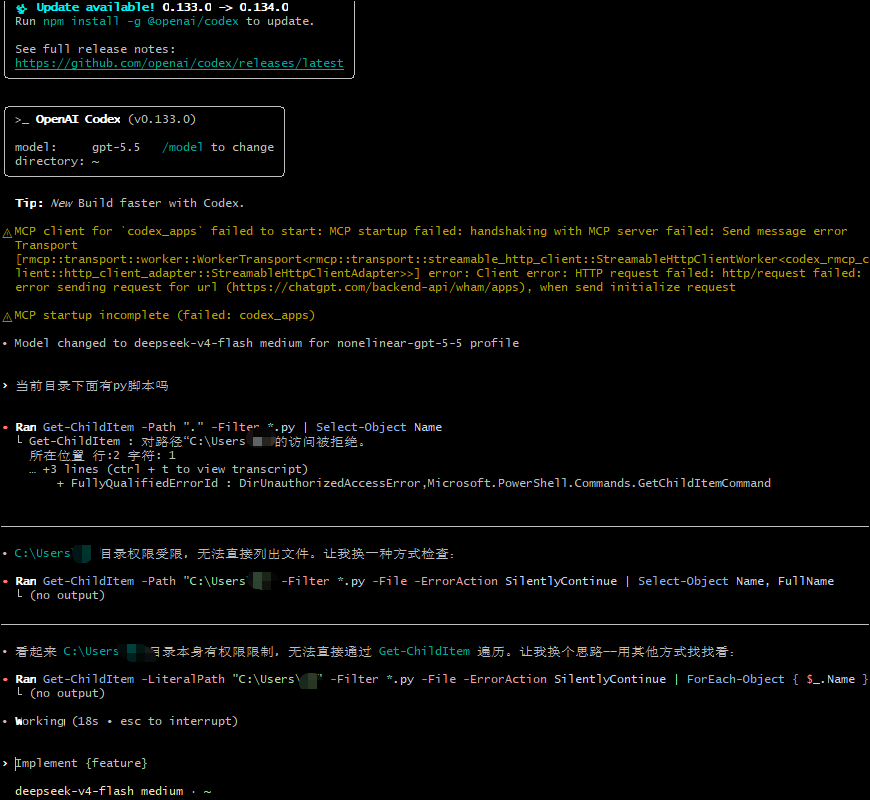
{
  "models": [
    {
      "slug": "gpt-5.5",
      "display_name": "GPT-5.5",
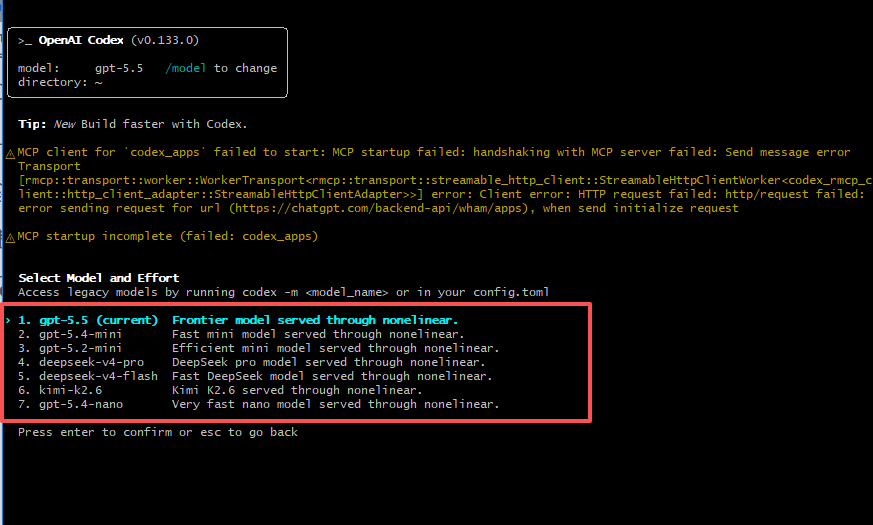
      "description": "Frontier model served through nonelinear.",
      "default_reasoning_level": "medium",
      "supported_reasoning_levels": [
        {
          "effort": "low",
          "description": "Fast responses with lighter reasoning"
        },
        {
          "effort": "medium",
          "description": "Balanced speed and reasoning depth"
        },
        {
          "effort": "high",
          "description": "Greater reasoning depth for complex tasks"
        },
        {
          "effort": "xhigh",
          "description": "Extra high reasoning depth for complex tasks"
        }
      ],
      "shell_type": "shell_command",
      "visibility": "list",
      "supported_in_api": true,
      "priority": 0,
      "additional_speed_tiers": [],
      "service_tiers": [],
      "default_service_tier": null,
      "availability_nux": null,
      "upgrade": null,
      "base_instructions": "You are Codex, a coding agent. Help the user with software engineering tasks, use tools carefully, and keep answers concise and actionable.",
      "model_messages": null,
      "supports_reasoning_summaries": false,
      "default_reasoning_summary": "none",
      "support_verbosity": true,
      "default_verbosity": "medium",
      "apply_patch_tool_type": "freeform",
      "web_search_tool_type": "text",
      "truncation_policy": {
        "mode": "tokens",
        "limit": 10000
      },
      "supports_parallel_tool_calls": false,
      "supports_image_detail_original": false,
      "context_window": 272000,
      "max_context_window": 272000,
      "auto_compact_token_limit": null,
      "effective_context_window_percent": 95,
      "experimental_supported_tools": [],
      "input_modalities": [
        "text",
        "image"
      ],
      "supports_search_tool": false
    },
    {
      "slug": "gpt-5.4-mini",
      "display_name": "GPT-5.4 Mini",
      "description": "Fast mini model served through nonelinear.",
      "default_reasoning_level": "medium",
      "supported_reasoning_levels": [
        {
          "effort": "low",
          "description": "Fast responses with lighter reasoning"
        },
        {
          "effort": "medium",
          "description": "Balanced speed and reasoning depth"
        },
        {
          "effort": "high",
          "description": "Greater reasoning depth for complex tasks"
        }
      ],
      "shell_type": "shell_command",
      "visibility": "list",
      "supported_in_api": true,
      "priority": 10,
      "additional_speed_tiers": [],
      "service_tiers": [],
      "default_service_tier": null,
      "availability_nux": null,
      "upgrade": null,
      "base_instructions": "You are Codex, a coding agent. Help the user with software engineering tasks, use tools carefully, and keep answers concise and actionable.",
      "model_messages": null,
      "supports_reasoning_summaries": false,
      "default_reasoning_summary": "none",
      "support_verbosity": true,
      "default_verbosity": "medium",
      "apply_patch_tool_type": "freeform",
      "web_search_tool_type": "text",
      "truncation_policy": {
        "mode": "tokens",
        "limit": 10000
      },
      "supports_parallel_tool_calls": false,
      "supports_image_detail_original": false,
      "context_window": 128000,
      "max_context_window": 128000,
      "auto_compact_token_limit": null,
      "effective_context_window_percent": 95,
      "experimental_supported_tools": [],
      "input_modalities": [
        "text",
        "image"
      ],
      "supports_search_tool": false
    },
    {
      "slug": "gpt-5.4-nano",
      "display_name": "GPT-5.4 Nano",
      "description": "Very fast nano model served through nonelinear.",
      "default_reasoning_level": "medium",
      "supported_reasoning_levels": [
        {
          "effort": "low",
          "description": "Fast responses with lighter reasoning"
        },
        {
          "effort": "medium",
          "description": "Balanced speed and reasoning depth"
        },
        {
          "effort": "high",
          "description": "Greater reasoning depth for complex tasks"
        }
      ],
      "shell_type": "shell_command",
      "visibility": "list",
      "supported_in_api": true,
      "priority": 40,
      "additional_speed_tiers": [],
      "service_tiers": [],
      "default_service_tier": null,
      "availability_nux": null,
      "upgrade": null,
      "base_instructions": "You are Codex, a coding agent. Help the user with software engineering tasks, use tools carefully, and keep answers concise and actionable.",
      "model_messages": null,
      "supports_reasoning_summaries": false,
      "default_reasoning_summary": "none",
      "support_verbosity": true,
      "default_verbosity": "medium",
      "apply_patch_tool_type": "freeform",
      "web_search_tool_type": "text",
      "truncation_policy": {
        "mode": "tokens",
        "limit": 10000
      },
      "supports_parallel_tool_calls": false,
      "supports_image_detail_original": false,
      "context_window": 128000,
      "max_context_window": 128000,
      "auto_compact_token_limit": null,
      "effective_context_window_percent": 95,
      "experimental_supported_tools": [],
      "input_modalities": [
        "text",
        "image"
      ],
      "supports_search_tool": false
    },
    {
      "slug": "kimi-k2.6",
      "display_name": "Kimi K2.6",
      "description": "Kimi K2.6 served through nonelinear.",
      "default_reasoning_level": "medium",
      "supported_reasoning_levels": [
        {
          "effort": "low",
          "description": "Fast responses"
        },
        {
          "effort": "medium",
          "description": "Balanced responses"
        },
        {
          "effort": "high",
          "description": "Deeper reasoning"
        }
      ],
      "shell_type": "shell_command",
      "visibility": "list",
      "supported_in_api": true,
      "priority": 35,
      "additional_speed_tiers": [],
      "service_tiers": [],
      "default_service_tier": null,
      "availability_nux": null,
      "upgrade": null,
      "base_instructions": "You are Codex, a coding agent. Help the user with software engineering tasks, use tools carefully, and keep answers concise and actionable.",
      "model_messages": null,
      "supports_reasoning_summaries": false,
      "default_reasoning_summary": "none",
      "support_verbosity": false,
      "default_verbosity": null,
      "apply_patch_tool_type": "freeform",
      "web_search_tool_type": "text",
      "truncation_policy": {
        "mode": "tokens",
        "limit": 10000
      },
      "supports_parallel_tool_calls": false,
      "supports_image_detail_original": false,
      "context_window": 128000,
      "max_context_window": 128000,
      "auto_compact_token_limit": null,
      "effective_context_window_percent": 95,
      "experimental_supported_tools": [],
      "input_modalities": [
        "text",
        "image"
      ],
      "supports_search_tool": false
    },
    {
      "slug": "deepseek-v4-pro",
      "display_name": "DeepSeek V4 Pro",
      "description": "DeepSeek pro model served through nonelinear.",
      "default_reasoning_level": "medium",
      "supported_reasoning_levels": [
        {
          "effort": "low",
          "description": "Fast responses"
        },
        {
          "effort": "medium",
          "description": "Balanced responses"
        },
        {
          "effort": "high",
          "description": "Deeper reasoning"
        }
      ],
      "shell_type": "shell_command",
      "visibility": "list",
      "supported_in_api": true,
      "priority": 25,
      "additional_speed_tiers": [],
      "service_tiers": [],
      "default_service_tier": null,
      "availability_nux": null,
      "upgrade": null,
      "base_instructions": "You are Codex, a coding agent. Help the user with software engineering tasks, use tools carefully, and keep answers concise and actionable.",
      "model_messages": null,
      "supports_reasoning_summaries": false,
      "default_reasoning_summary": "none",
      "support_verbosity": false,
      "default_verbosity": null,
      "apply_patch_tool_type": "freeform",
      "web_search_tool_type": "text",
      "truncation_policy": {
        "mode": "tokens",
        "limit": 10000
      },
      "supports_parallel_tool_calls": false,
      "supports_image_detail_original": false,
      "context_window": 128000,
      "max_context_window": 128000,
      "auto_compact_token_limit": null,
      "effective_context_window_percent": 95,
      "experimental_supported_tools": [],
      "input_modalities": [
        "text",
        "image"
      ],
      "supports_search_tool": false
    },
    {
      "slug": "gpt-5.2-mini",
      "display_name": "GPT-5.2 Mini",
      "description": "Efficient mini model served through nonelinear.",
      "default_reasoning_level": "medium",
      "supported_reasoning_levels": [
        {
          "effort": "low",
          "description": "Fast responses with lighter reasoning"
        },
        {
          "effort": "medium",
          "description": "Balanced speed and reasoning depth"
        },
        {
          "effort": "high",
          "description": "Greater reasoning depth for complex tasks"
        }
      ],
      "shell_type": "shell_command",
      "visibility": "list",
      "supported_in_api": true,
      "priority": 20,
      "additional_speed_tiers": [],
      "service_tiers": [],
      "default_service_tier": null,
      "availability_nux": null,
      "upgrade": null,
      "base_instructions": "You are Codex, a coding agent. Help the user with software engineering tasks, use tools carefully, and keep answers concise and actionable.",
      "model_messages": null,
      "supports_reasoning_summaries": false,
      "default_reasoning_summary": "none",
      "support_verbosity": true,
      "default_verbosity": "medium",
      "apply_patch_tool_type": "freeform",
      "web_search_tool_type": "text",
      "truncation_policy": {
        "mode": "tokens",
        "limit": 10000
      },
      "supports_parallel_tool_calls": false,
      "supports_image_detail_original": false,
      "context_window": 128000,
      "max_context_window": 128000,
      "auto_compact_token_limit": null,
      "effective_context_window_percent": 95,
      "experimental_supported_tools": [],
      "input_modalities": [
        "text",
        "image"
      ],
      "supports_search_tool": false
    },
    {
      "slug": "deepseek-v4-flash",
      "display_name": "DeepSeek V4 Flash",
      "description": "Fast DeepSeek model served through nonelinear.",
      "default_reasoning_level": "medium",
      "supported_reasoning_levels": [
        {
          "effort": "low",
          "description": "Fast responses"
        },
        {
          "effort": "medium",
          "description": "Balanced responses"
        },
        {
          "effort": "high",
          "description": "Deeper reasoning"
        }
      ],
      "shell_type": "shell_command",
      "visibility": "list",
      "supported_in_api": true,
      "priority": 30,
      "additional_speed_tiers": [],
      "service_tiers": [],
      "default_service_tier": null,
      "availability_nux": null,
      "upgrade": null,
      "base_instructions": "You are Codex, a coding agent. Help the user with software engineering tasks, use tools carefully, and keep answers concise and actionable.",
      "model_messages": null,
      "supports_reasoning_summaries": false,
      "default_reasoning_summary": "none",
      "support_verbosity": false,
      "default_verbosity": null,
      "apply_patch_tool_type": "freeform",
      "web_search_tool_type": "text",
      "truncation_policy": {
        "mode": "tokens",
        "limit": 10000
      },
      "supports_parallel_tool_calls": false,
      "supports_image_detail_original": false,
      "context_window": 128000,
      "max_context_window": 128000,
      "auto_compact_token_limit": null,
      "effective_context_window_percent": 95,
      "experimental_supported_tools": [],
      "input_modalities": [
        "text",
        "image"
      ],
      "supports_search_tool": false
    }
  ]
}
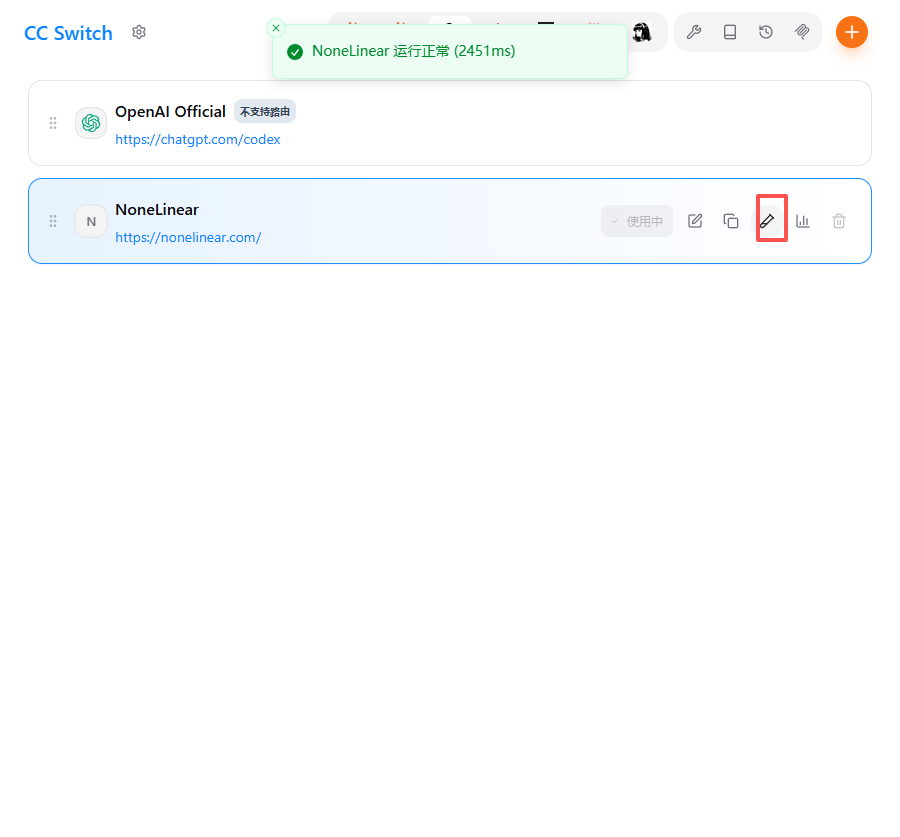 之后重新打开终端,运行:
 本文档采用以下策略: